May Newsletter ͏  ͏  ͏  ͏  ͏  ͏  ͏  ͏  ͏  ͏  ͏  ͏  ͏  ͏  ͏  ͏  ͏  ͏  ͏  ͏  ͏  ͏  ͏  ͏  ͏  ͏  ͏  ͏  ͏  ͏  ͏  ͏  ͏  ͏  ͏  ͏  ͏  ͏  ͏  ͏  ͏  ͏  ͏  ͏  ͏  ͏  ͏  ͏  ͏  ͏  ͏  ͏  ͏  ͏  ͏  ͏  ͏  ͏  ͏  ͏  ͏  ͏  ͏  ͏  ͏  ͏  ͏  ͏  ͏  ͏  ͏  ͏  ͏  ͏  ͏  ͏  ͏  ͏  ͏  ͏  ͏  ͏  ͏  ͏  ͏  ͏  ͏  ͏  ͏  ͏  ͏  ͏  ͏  ͏  ͏  ͏  ͏  ͏  ͏  ͏  ͏  ͏  ͏  ͏  ͏  ͏  ͏  ͏  ͏  ͏  ͏  ͏  ͏  ͏  ͏  ͏  ͏  ͏  ͏  ͏ ­ ­ ­ ­ ­ ­ ­ ­ ­ ­ ­ ­ ­ ­ ­ ­ ­ ­ ­ ­ ­ ­ ­ ­ ­ ­ ­ ­ ­ ­ ­ ­ ­ ­ ­ ­ ­ ­ ­ ­ ­ ­ ­ ­ ­ ­ ­ ­ ­ ­ ­ ­ ­ ­ ­ ­ ­ ­ ­ ­ ­ ­ ­ ­ ­ ­ ­ ­ ­ ­ ­ ­ ­ ­ ­ ­ ­ ­ ­ ­ ­ ­ ­ ­ ­ ­ ­ ­ ­ ­ ­ ­ ­ ­ ­ ­ ­ ­ ­ ­ ­ ­ ­ ­ ­ ­ ­ ­ ­ ­ ­ ­ ­ ­ ­ ­ ­ ­ ­ ­ ­ ­ ­ ­ ­ ­ ­ ­ ­ ­ ­ ­ ­ ­ ­ ­ ­ ­ ­ ­ ­ ­ ­ ­ ­ ­ ­ ­ ­ ­ ­ ­ ­ ­ ­ ­ ­ ­ ­ ­ ­ ­ ­ ­ ­ ­ ­ ­ ­ ­ ­ ­ ­ ­ ­ ­ ­ ­ ­ ­ ­ ­ ­ ­ ­ ­ ­ ­ ­ ­ ­ ­ ­ ­ ­    ͏  ͏  ͏  ͏  ͏  ͏  ͏  ͏  ͏  ͏  ͏  ͏  ͏  ͏  ͏  ͏  ͏  ͏  ͏  ͏  ͏  ͏  ͏  ͏  ͏  ͏  ͏  ͏  ͏  ͏  ͏  ͏  ͏  ͏  ͏  ͏  ͏  ͏  ͏  ͏  ͏  ͏  ͏  ͏  ͏  ͏  ͏  ͏  ͏  ͏  ͏  ͏  ͏  ͏  ͏  ͏  ͏  ͏  ͏  ͏  ͏  ͏  ͏  ͏  ͏  ͏  ͏  ͏  ͏  ͏  ͏  ͏  ͏  ͏  ͏  ͏  ͏  ͏  ͏  ͏  ͏  ͏  ͏  ͏  ͏  ͏  ͏  ͏  ͏  ͏  ͏  ͏  ͏  ͏  ͏  ͏  ͏  ͏  ͏  ͏  ͏  ͏  ͏  ͏  ͏  ͏  ͏  ͏  ͏  ͏  ͏  ͏  ͏  ͏  ͏  ͏  ͏  ͏  ͏  ͏ ­ ­ ­ ­ ­ ­ ­ ­ ­ ­ ­ ­ ­ ­ ­ ­ ­ ­ ­ ­ ­ ­ ­ ­ ­ ­ ­ ­ ­ ­ ­ ­ ­ ­ ­ ­ ­ ­ ­ ­ ­ ­ ­ ­ ­ ­ ­ ­ ­ ­ ­ ­ ­ ­ ­ ­ ­ ­ ­ ­ ­ ­ ­ ­ ­ ­ ­ ­ ­ ­ ­ ­ ­ ­ ­ ­ ­ ­ ­ ­ ­ ­ ­ ­ ­ ­ ­ ­ ­ ­ ­ ­ ­ ­ ­ ­ ­ ­ ­ ­ ­ ­ ­ ­ ­ ­ ­ ­ ­ ­ ­ ­ ­ ­ ­ ­ ­ ­ ­ ­ ­ ­ ­ ­ ­ ­ ­ ­ ­ ­ ­ ­ ­ ­ ­ ­ ­ ­ ­ ­ ­ ­ ­ ­ ­ ­ ­ ­ ­ ­ ­ ­ ­ ­ ­ ­ ­ ­ ­ ­ ­ ­ ­ ­ ­ ­ ­ ­ ­ ­ ­ ­ ­ ­ ­ ­ ­ ­ ­ ­ ­ ­ ­ ­ ­ ­ ­ ­ ­ ­ ­ ­ ­ ­ ­  
View in browser
Email Header (1)
May Tech it out header

Transform Learning. Enrich Faith.

This newsletter emphasizes CTN's support for teachers and the tailored partnerships we create for each school's unique needs. We offer technology solutions, personalized professional development, and one-on-one support to foster educator growth. If you're interested in partnering with us, please complete the form to arrange a meeting.

Partner with CTN
Renaissance

📈 Getting the Most Out of Your Student Report Cards

EOY Data


What Are Renaissance Report Cards?

This month, we're highlighting a powerful tool you already have access to: Renaissance Report Cards. Whether you're preparing for parent-teacher conferences, monitoring student progress, or sharing data with administrators, here's everything you need to know. Report Cards give you and parents a comprehensive overview of how each student is performing. By combining recent and overall performance and progress, you'll have clear insight into how best to meet each student's needs.


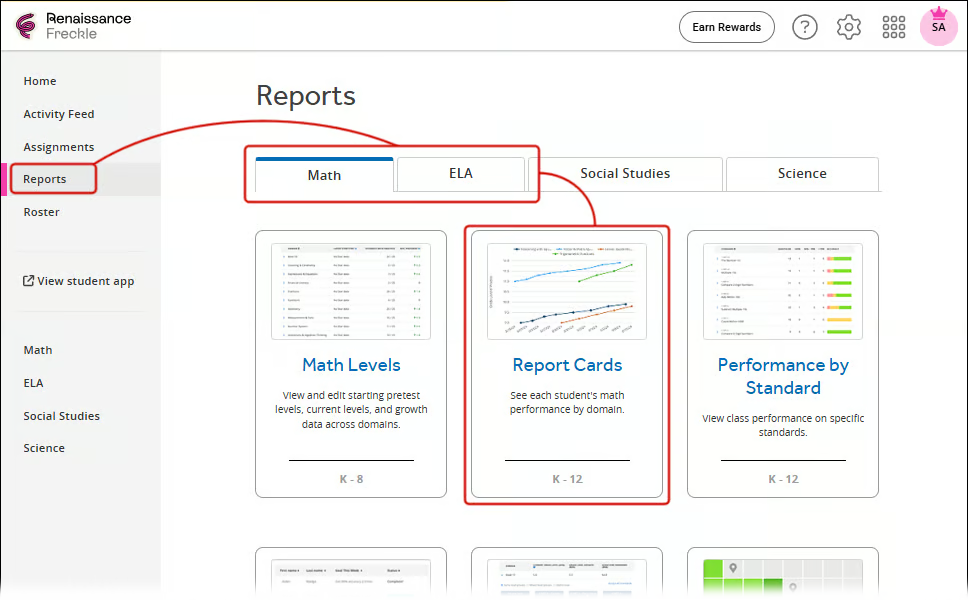
Where to Find Them

  1. Go to your teacher's home dashboard

  2. Select Reports on the left sidebar

  3. Choose Math or ELA

  4. Select Report Cards (or ELA Report Cards for ELA)

💡 Tip: Use the Class drop-down menu to switch between your rosters, and sort columns by clicking the column headers!


What Data Can You See?

At a glance, see data for all students in your roster:

  • Math: Questions answered today, questions answered this school year, lifetime coins earned
  • ELA: Freckle text level and Word Study level

💡 Pro Tips


✨ Use the Class, Student, and Time Period drop-down lists at the top of any report card to quickly change the data you're viewing

✨ Click the arrow next to accuracy percentages to see detailed question-level data

✨ Filter standards by grade level or course to focus on relevant content

✨ Generate reports with custom date ranges to highlight specific periods of growth

Not sure how to log in to Freckle or Lalilo?

See login steps below!

Sign in Steps (3)

Have questions about Lalilo? Reach out to the CTN Team at CTN@desalesmedia.org 

DE

Interactive Activities Spotlight


Interactive activities are digital lessons where students learn by doing—answering, moving, exploring, and problem-solving in real time. Some of these popular interactives were created by our very own diocesan teachers!


✨ Blessed Carlos Acutis by Sue Jo Feeley
✨ NY Science Review by Doreen Caracappa
✨ Black Holes & Neutrinos by Doreen Caracappa

  • Paird with reading: Did Scientists Just Detect an Exploding Black Hole?

✨ Bonus: Sneak Peek Girls & STEM Choice Board


Have you created your own interactive on Discovery Education? Share the link with us, and you'll be featured next month!

Think Outside the Box!

Are your students looking for a fun way to learn difficult concepts between state testing and lessons? Try these activities!

  • LEGO Play to Lean Choice Board Gr. 3-8
  • The Power of Stories: The Weekly Edit Gr. 6-8
  • Doubling and Halving with Animals: Math Talks Gr.3-5
  • Apples: Sentence Fix-It Gr. PreK-2
DE Interactive
Confirmation on DE

The Sacrament of Confirmation on DE!

On our CTN Channel, you can find religious videos from Holy Communion to Confirmation and more. Still need some Confirmation resources? Check out these resources!

  • I’m Lost and Need My GPS    
    • I’m Lost and Need My GPS Teacher Guide PDF
  • Confirmation is not Graduation 
    • Confirmation is not Graduation Teacher Guide PDF
  • What are the Sacraments 
Tech it out Section Break-1

We are excited to build a stronger teacher community across our Diocese! To ensure we create a communication platform that truly works for YOU, we need your input.


💡Why are we doing this survey?

Our goal is to establish a central hub where teachers can:

  • Share best practices and innovative teaching strategies
  • Collaborate and support one another
  • Access professional learning opportunities
  • Build meaningful connections with colleagues across grade levels and subject areas
  • Receive timely CTN updates and announcements


What will we do with your feedback?


We're evaluating three potential platforms—Google Classroom, Slack, and Google Groups—to determine which best meets our community's needs. Your responses will help us choose the right tool and set it up to fit YOUR workflow and preferences.


This survey should take about 5-7 minutes to complete. Your honest feedback is invaluable!

Teacher Community Survey
Tech it out Section Break

Making Thoughtful Decisions About Generative AI in Your Classroom


What is the SEE Framework?

The SEE Framework is a practical decision-making tool that asks three critical questions before using generative AI:


🛡️ SAFE — What risks, protections, permissions, or safeguards need consideration?
⚖️ ETHICAL — What questions of responsibility, fairness, transparency, or human judgment arise?
✅ EFFECTIVE — Does GenAI meaningfully support learning or practice here, and how will you know?


Rather than offering universal "right answers," this framework helps you exercise professional judgment by considering all three lenses together.


Real Scenarios You Can Apply This To


✏️ Student use of AI tutors for homework help
📝 Using GenAI to draft parent communications
📊 Designing assessments in an AI-enabled classroom
🔍 Evaluating new AI tools for your school
📋 Making school or district implementation decisions
🤖 Deciding whether to pilot an AI grading tool


The+See+Framework+A+Practical+Guide+to+Building+AI+Literacy+(04.16.2026)+(4) (1)

How to Use the Template

  1. Describe your scenario — What dilemma or opportunity are you facing?


  2. Ask SAFE questions — What protections do I need?


  3. Ask ETHICAL questions — What fairness and transparency issues matter?


  4. Ask EFFECTIVE questions — Will this actually support student learning?


  5. Arrive at a decision — Integrate all three lenses


  6. Reflect & refine — What would colleagues add? How might context change this?


What would you like to read about AI for Admins or Teachers?

  • What’s a topic you’d like to see covered here? Email us at CTN@desales,media.org and let us know.

  • Have you used AI in a way you’d like to share with your school community? Email us at CTN@desales,media.org and let us know.

  • Would you like to write a guest post to support and equip our readers? Email us at CTN@desales,media.org and let us know.

CTN_logo


CTN is a service of DeSales Media Group, providing instructional media resources to the parishes and academies of the Diocese of Brooklyn


Facebook
X
Instagram

DeSales Media Group, 860 Pacific St., Brooklyn, NY 11238

Unsubscribe Manage preferences